Sunday, 21 April 2013

Playing with Google App Engine

I am following the the Web Development (CS253) course offered by Udacity. If you do have spare time, I would recommend this course. Yes, I have worked with web technologies for few years, but this course is a good eye opener!. Above all its all free!. It is taught by Steve Huffman (co founder of reddit).

I primarily code in .NET and recently started looking at Python. I have to say, its so good, and refreshing. 

As a part of the course, we are introduced to Google App Engine. It is fantastic! 

One of the tasks in the course was to create a simple blog using Python and Google App Engine. The blog uses the Google App Engine data store, which is a massively scalable distributed database.  

If you have not used Google App Engine, have a look at today. 

My skeletal blog is here.

Tuesday, 16 April 2013

("quirky") SQL Server with IIS App Pool users

Scene

So you have developed a great .NET MVC web application. All the unit/integration tests passing and ready to go live!. You have tested the site using Visual Studio built-in web server (Cassini) and would like to try it out in "real" IIS.

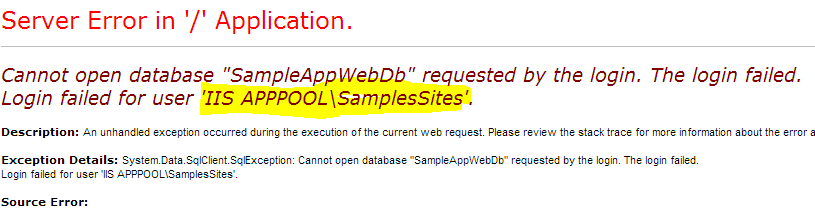
New site is created and deployed but you are faced with the "yellow-screen-of-death".


The issue is that the site is impersonating the application pool user. As we just want to view the site, we can go to SQL Server and give the application pool user (IIS APPPOOL\SamplesSites) the permission to read the database. Simple!

Problem

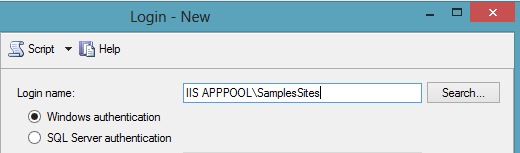
We can add a new SQL Server user mapped to the IIS AppPool user. (See below.)


Looks good, but when we try to add a new user, we get the following error.


This is very strange. Even though the "Select User" dialog finds the application pool user, it cannot be mapped to a SQL Server login.

Solution

Here comes the MAGIC!

If you return to the "Login - New" dialog and type in the application pool user and click "OK" then the login is added.


Once the user is added, you can see it by expanding the security tab. (See below).


Fun!

(see this post for more information.)

Friday, 12 April 2013

("quirky") Entity Framework with DatabaseGeneratedOption.Identity

I am pretty impressed with Entity Framework 5 so far. Especially Entity Framework Code First is a massive time saver!

Caution
I recently needed to share a reference to a row in a table with an external system. Simplest solution is to share the primary key which most of the time is auto incremental unique value. From the outset this does not look too bad. However, sharing primary keys can be a massive security flow. If a someone gets hold of the primary key, they can "guess" what the next key might be.

Setup
Entity Framework kindly provide us a standard pattern to setup a primary key for an entity. See the following model class.


The "Id" is set to be the primary key, with the seed and increment set to 1. See the following illustration.


It is never a good idea to share technical keys outside the application boundary. The way around is to have random key that is uniquely identifies the row. We can achieve this by introducing a new "Reference" column with the type "GUID". The modified model class looks like the following.


Problem
There two ways to populate the GUID. The simplest approach is to create a new GUID (GUID.NewGuid()) just before saving the entity.  This is proven to work and reliable.

Alternatively we can get the database to do the work and generate a new GUID. In order to force the database to create the GUID automatically, we need to "inform" Entity Framework our intention. The first step is the update the model class to the following. (BTW you need to reference System.ComponentModel.DataAnnotations.Schema namespace). I am using data annotation, but the same behavior can be achieved by the Entity Framework fluent API.


I find the syntax pretty strange. We are basically saying that "Reference" is the "identity" of the entity. Does this mean primary key is no longer the "identity"? (we'll find out soon).

If you regenerate the database (using Entity Framework Code First) what you see may surprise you. By the outset the table looks pretty good. (see the illustration).


As expected the "Id" is the primary key and the "Reference" is an uniqueidentifier field.The biggest surprise is the seed and the increment for the primary key. (see below.)


The seed and the increment is not set and worse "Id" column is no longer the identity. This is strange. 

If we dig a just a bit deeper, we see how SQL Server generate the uniqueidentifier automatically (see below).


The "DefaultValue" is set to "NewId()" which is how SQL Server generate a GUID. When a new row is added, the "NewId()" function is invoked and it populates the "Reference" column.

Solution
We yet fix the problem. Our desire is to have an incremental primary key and a random "Reference". In order to achieve this, we need to update the model to the following. 


The key point here is that we have added "DatabaseGeneratedOption.Identity" to the "Id". This adds the seed and increment to "Id". So when we add a new entity database, automatically generate a random "GUID". The GUID is safe and can be shared externally.

Sunday, 24 March 2013

Reading Blobs from SQL Server in chunks

There are many reasons why we want to store blobs in SQL Server, instead of a path to a file. Security  might be a very good reason.

We can use the varbinary type in SQL Server to store blob data. 

So, lets say that we managed to get some blob data to SQL Server. We can simply use ADO.NET, Entity Framework to read this data. This task is straight forward. Now, consider the scenario where there is a large blob, and we want to read it in chucks. We might do this in order to optimise the application performance (streaming), network traffic. We do not want our applications to "hang", while blobs are being read from SQL Server!

I have created a very simple table, and the schema looks like below: 


Lets get some binary data to our table:


Ensure to replace the path to a file in your system. 

I will be using Visual Studio Express 2012. Instead of just showing the code, I would like to highlight the most important points. 

The first stage is to make a connection to the database. For this, we can simply use the SqlConnection class. Thereafter we will use SqlDataReader class to read the data. The following is the first part of the class.


Don't worry too much about this, just keep an eye on the SqlConnection and SqlDataReader. In the constructor, I have created an instance of SqlConnection with a connection string. Again, you will need to set your own connection string. 

The next point is the "CommandString". This is the SQL I will be using to read data from our table. The keyword that stands out from this string is "DATALENGTH". We use DATALENGTH  to find out the size (length) of the byte stream stored in the "Payload" column.

The DATALENGTH function returns the number of bytes in the "Payload". We will be reading 1MB at time and I have created the "ChunkSizeBytes" variable to store the maximum size of the chunk. 

We can now open the connection the database. 

In the above method, I have used SqlCommand class and has initialised it with the "CommandString" and the connection. Thereafter we can execute the command with the "SequentialAccess" command behavior. This is the most important piece of the puzzle. By using this behavior we are essentially configuring our connection not to read the entire blob, but read it as a stream. The next behavior is "CloseConnection", which closes the connection when the reader finished reading. 

Next step is to read the data.


The above method reads the "Payload" data in 1MB chunks. We use the "GetBytes" method to read the chunk. Yes, there are many optimisations that you can do to this method. The first is not to "re-initialise" the "bytes" variable, but to reuse it. 
What is basically happening here is that, the "callback" delegate is invoked for each chunk. 

 The Console application looks like below:


Nothing major, I simply write the bytes to a file. This is what I got when I execute the application.


You can see that the delegate was called 5 times and we did not receive the full 1MB in the last attempt. 


We can see that the file is only 4.6MB, and maps directly to the results we saw in the console application. 

My PDF works!


Enjoy! (BTW - code is here)

Saturday, 16 February 2013

How pure are you.....? (1)

The development of software is an investment. Similar to any other investment, there are investors. Return on investment (ROI) is what really matters for the investors. (Investment 101)!  ROI impact our pensions, lifestyle, and EVERYTHING in between.

I was told recently that there must only be a single Assert in a unit test method. Okay, absolutely I would agree in principal. The real question is, do we take this statement literally or in principal.

Consider the following code:


We can test the "GetResult" method with various inputs. From a purist point of view a typical test might look like below:


For each input we will need to ensure that the "dateTimeGetter" delegate is called. There are two tests one for checking the value and another for the date and time. Waste of time ( () => money => everything) if you ask me!

Instead we can write a single test to ensure that the correct value is returned together with the expected date and time.


I think we need to strike a balance when it comes to writing concise tests that make sense to the code reviewer. Just because someone wrote in a book, we must NOT take it on its face value.

I believe a developer must be pragmatic and add value to the business. The value should be tangible such as a new functionality so that business see progress.

The key to success in software development is to have well architectured, maintainable and readable code that meet the three pillars of the project. (Quality, Cost and time).

Monday, 11 February 2013

"Simple" Service Locator

The Service Locator pattern has been subjected to many arguments and surely it will continue for many more years. As usual the best source to learn about the Service Locator pattern is from Martin Fowler.


 Design patterns 


Design patterns, when used correctly can help to "craft" the software. However design patterns can easily make the code hard to understand too. So I guess there should always be a balance. My objective of this post is not to argue that Service Locator is an anti-pattern or not. My goal is just to write few lines of code and see how all fits together. I thought I will write a "form" of service locator that anyone can understand. 

"Simple" Service Locator 


The interface of the "simple" Service Locator looks like below:

I created a simple Console application that uses this Service Locator. The usage looks like below:


Limitations 

A type must always implement an Interface.
A type implementing multiple interfaces must be registered separately.
Only an interface can be registered against a type. ... etc etc, Many more.

If you interested in the code you can download it from GitHub.

Friday, 8 February 2013

Entity Framework 5: Extracting Schema (be careful)

Entity Framework 5 (EF5) Code First is a fantastic addition when you are designing the model. EF5 Code First supports the following options for creating a database:

  1. drop and create the database, 
  2. drop and create database if model changes or 
  3. use an existing database
This is great for when developing the application. However I think dropping and creating databases in production environment is something that any sane person will discourage  Normally prior to executing a script (especially creating a database) in production, it has to be reviewed and validated. So, how can you extract the schema SQL from EF5 Code First model.

How to


Lets create a very simple data context using EF5 Code First. See the following.

    /// <summary>
    /// This class represents a simple context.
    /// </summary>
    public class DataContext : DbContext
    {
        public DataContext(string connectionString)
            : base(connectionString)
        {
        }   
 
        public DbSet<School> Schools { getset; }
    }

    /// <summary>
    /// This class represents a School.
    /// </summary>
    public class School
    {
        public int Id { getset; }
 
        public string Name { getset; }
    }

I have created a console application to put everything together.

class Program
    {
        static void Main(string[] args)
        {
            // Database strategy
            Database.SetInitializer<DataContext>(new DropCreateDatabaseIfModelChanges<DataContext>()
);
 
            // ConnectionString
            var connString = "Server=.; Database=EFGenSchema; Trusted_Connection=yes";
 
            var dataContext = new DataContext(connString);
 
            var objectContext = (IObjectContextAdapter)dataContext;
 
            var scripts = objectContext.ObjectContext.CreateDatabaseScript();
 
            Console.WriteLine(scripts);
 
            Console.ReadKey();
        }
    }

I have highlighted the critical parts of the code. The "DataContext" (which is derived from DbContext) is cast to "IObjectContextAdapter". Then we get a handle of the old "ObjectContext" (i.e. from EF4). Thereafter the "CreateDatabaseScript()" method is called. Following is what you see in the console window.


Well... perfect!, you might say... But wait!!!

Got-ya


Initially I thought EF5 inspects the classes registered in the data context and then generates the appropriate SQL. I was wrong. 

Open the SQL Server Profiler and then re-execute the above code to generate the schema. Following is what you will see.


Wow!, EF5 is creating the database and doing its work. All I asked was to create the SQL script. 

To be honest, this was really puzzling to me. The API is clearly named "CreateDatabaseScript()" and there is nothing to indicate that as a side-effect, the database is created. I am bit surprised why this behavior is not documented.

Now instead of using the "Drop Create Database when model changes" you can set the database initialisation strategy to "null". See below:

            // Database strategy
            Database.SetInitializer<DataContext>(null);

If you now execute the above schema generation code (with database initilisation strategy set to null), you will not see any attempts by EF5 make a connection with the database server in SQL Server Profiler.

Therefore if there is a requirement to extract the schema from EF5 Code First model, make sure to set the correct database initialisation strategy.