Showing posts with label Entity Framework. Show all posts

Friday, 12 April 2013

("quirky") Entity Framework with DatabaseGeneratedOption.Identity

I am pretty impressed with Entity Framework 5 so far. Especially Entity Framework Code First is a massive time saver!

Caution
I recently needed to share a reference to a row in a table with an external system. Simplest solution is to share the primary key which most of the time is auto incremental unique value. From the outset this does not look too bad. However, sharing primary keys can be a massive security flow. If a someone gets hold of the primary key, they can "guess" what the next key might be.

Setup
Entity Framework kindly provide us a standard pattern to setup a primary key for an entity. See the following model class.


The "Id" is set to be the primary key, with the seed and increment set to 1. See the following illustration.


It is never a good idea to share technical keys outside the application boundary. The way around is to have random key that is uniquely identifies the row. We can achieve this by introducing a new "Reference" column with the type "GUID". The modified model class looks like the following.


Problem
There two ways to populate the GUID. The simplest approach is to create a new GUID (GUID.NewGuid()) just before saving the entity.  This is proven to work and reliable.

Alternatively we can get the database to do the work and generate a new GUID. In order to force the database to create the GUID automatically, we need to "inform" Entity Framework our intention. The first step is the update the model class to the following. (BTW you need to reference System.ComponentModel.DataAnnotations.Schema namespace). I am using data annotation, but the same behavior can be achieved by the Entity Framework fluent API.


I find the syntax pretty strange. We are basically saying that "Reference" is the "identity" of the entity. Does this mean primary key is no longer the "identity"? (we'll find out soon).

If you regenerate the database (using Entity Framework Code First) what you see may surprise you. By the outset the table looks pretty good. (see the illustration).


As expected the "Id" is the primary key and the "Reference" is an uniqueidentifier field.The biggest surprise is the seed and the increment for the primary key. (see below.)


The seed and the increment is not set and worse "Id" column is no longer the identity. This is strange. 

If we dig a just a bit deeper, we see how SQL Server generate the uniqueidentifier automatically (see below).


The "DefaultValue" is set to "NewId()" which is how SQL Server generate a GUID. When a new row is added, the "NewId()" function is invoked and it populates the "Reference" column.

Solution
We yet fix the problem. Our desire is to have an incremental primary key and a random "Reference". In order to achieve this, we need to update the model to the following. 


The key point here is that we have added "DatabaseGeneratedOption.Identity" to the "Id". This adds the seed and increment to "Id". So when we add a new entity database, automatically generate a random "GUID". The GUID is safe and can be shared externally.

Friday, 8 February 2013

Entity Framework 5: Extracting Schema (be careful)

Entity Framework 5 (EF5) Code First is a fantastic addition when you are designing the model. EF5 Code First supports the following options for creating a database:

  1. drop and create the database, 
  2. drop and create database if model changes or 
  3. use an existing database
This is great for when developing the application. However I think dropping and creating databases in production environment is something that any sane person will discourage  Normally prior to executing a script (especially creating a database) in production, it has to be reviewed and validated. So, how can you extract the schema SQL from EF5 Code First model.

How to


Lets create a very simple data context using EF5 Code First. See the following.

    /// <summary>
    /// This class represents a simple context.
    /// </summary>
    public class DataContext : DbContext
    {
        public DataContext(string connectionString)
            : base(connectionString)
        {
        }   
 
        public DbSet<School> Schools { getset; }
    }

    /// <summary>
    /// This class represents a School.
    /// </summary>
    public class School
    {
        public int Id { getset; }
 
        public string Name { getset; }
    }

I have created a console application to put everything together.

class Program
    {
        static void Main(string[] args)
        {
            // Database strategy
            Database.SetInitializer<DataContext>(new DropCreateDatabaseIfModelChanges<DataContext>()
);
 
            // ConnectionString
            var connString = "Server=.; Database=EFGenSchema; Trusted_Connection=yes";
 
            var dataContext = new DataContext(connString);
 
            var objectContext = (IObjectContextAdapter)dataContext;
 
            var scripts = objectContext.ObjectContext.CreateDatabaseScript();
 
            Console.WriteLine(scripts);
 
            Console.ReadKey();
        }
    }

I have highlighted the critical parts of the code. The "DataContext" (which is derived from DbContext) is cast to "IObjectContextAdapter". Then we get a handle of the old "ObjectContext" (i.e. from EF4). Thereafter the "CreateDatabaseScript()" method is called. Following is what you see in the console window.


Well... perfect!, you might say... But wait!!!

Got-ya


Initially I thought EF5 inspects the classes registered in the data context and then generates the appropriate SQL. I was wrong. 

Open the SQL Server Profiler and then re-execute the above code to generate the schema. Following is what you will see.


Wow!, EF5 is creating the database and doing its work. All I asked was to create the SQL script. 

To be honest, this was really puzzling to me. The API is clearly named "CreateDatabaseScript()" and there is nothing to indicate that as a side-effect, the database is created. I am bit surprised why this behavior is not documented.

Now instead of using the "Drop Create Database when model changes" you can set the database initialisation strategy to "null". See below:

            // Database strategy
            Database.SetInitializer<DataContext>(null);

If you now execute the above schema generation code (with database initilisation strategy set to null), you will not see any attempts by EF5 make a connection with the database server in SQL Server Profiler.

Therefore if there is a requirement to extract the schema from EF5 Code First model, make sure to set the correct database initialisation strategy. 


Sunday, 30 December 2012

Entity Framework 5 - Auto incremental GUID columns

I started poking around Entity Framework 5 using VS 2012 Express edition.

One of the tests I wanted to do was to find out how EF5 handles auto-incremental GUIDs. So here goes...

Reproducing the problem


I will be using database-first model using SQL Server 2012 Express.


I have highlighted the important areas. Basically table has a "Status" column that is set to use "NewId()" binding. This will automatically create a Guid when a new row is inserted.

Thereafter a new conceptual model was created. (See below.)

Once the corresponding EDMX file is created, it will be opened in the Visual Studio editor by default. As there is only a single table in the database, one entity will be created.

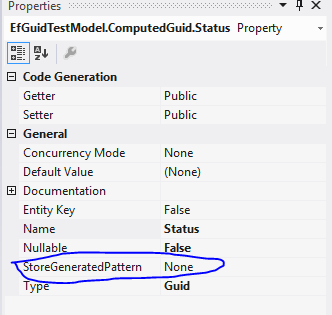
Click on the "Status" scalar property to view its properties.


Keep a close eye on the "StoreGeneratedPattern". This properties is what EF uses to determine the value population strategy of the given column. The available options are "Identity" and "Computed".

We set the binding in the SQL Server to auto populate the "Status" column (NewId()). However when we add a new row to the table using EF, following is what we get.


This is most surely not that we want. The "Status" value is set to the default Guid value.

Fixing the issue

Actually the fixing the problem is pretty easy... What we need to do is to return to the conceptual model and update the "StoreGeneratedPattern" of "Status" property to "Computed" as below.


By updating the property to "Computed"; it notifies the EF that the value of the property is calculated by the store (in this case SQL Server).


Just watch out!