Sunday, 24 March 2013

Reading Blobs from SQL Server in chunks

There are many reasons why we want to store blobs in SQL Server, instead of a path to a file. Security  might be a very good reason.

We can use the varbinary type in SQL Server to store blob data. 

So, lets say that we managed to get some blob data to SQL Server. We can simply use ADO.NET, Entity Framework to read this data. This task is straight forward. Now, consider the scenario where there is a large blob, and we want to read it in chucks. We might do this in order to optimise the application performance (streaming), network traffic. We do not want our applications to "hang", while blobs are being read from SQL Server!

I have created a very simple table, and the schema looks like below: 


Lets get some binary data to our table:


Ensure to replace the path to a file in your system. 

I will be using Visual Studio Express 2012. Instead of just showing the code, I would like to highlight the most important points. 

The first stage is to make a connection to the database. For this, we can simply use the SqlConnection class. Thereafter we will use SqlDataReader class to read the data. The following is the first part of the class.


Don't worry too much about this, just keep an eye on the SqlConnection and SqlDataReader. In the constructor, I have created an instance of SqlConnection with a connection string. Again, you will need to set your own connection string. 

The next point is the "CommandString". This is the SQL I will be using to read data from our table. The keyword that stands out from this string is "DATALENGTH". We use DATALENGTH  to find out the size (length) of the byte stream stored in the "Payload" column.

The DATALENGTH function returns the number of bytes in the "Payload". We will be reading 1MB at time and I have created the "ChunkSizeBytes" variable to store the maximum size of the chunk. 

We can now open the connection the database. 

In the above method, I have used SqlCommand class and has initialised it with the "CommandString" and the connection. Thereafter we can execute the command with the "SequentialAccess" command behavior. This is the most important piece of the puzzle. By using this behavior we are essentially configuring our connection not to read the entire blob, but read it as a stream. The next behavior is "CloseConnection", which closes the connection when the reader finished reading. 

Next step is to read the data.


The above method reads the "Payload" data in 1MB chunks. We use the "GetBytes" method to read the chunk. Yes, there are many optimisations that you can do to this method. The first is not to "re-initialise" the "bytes" variable, but to reuse it. 
What is basically happening here is that, the "callback" delegate is invoked for each chunk. 

 The Console application looks like below:


Nothing major, I simply write the bytes to a file. This is what I got when I execute the application.


You can see that the delegate was called 5 times and we did not receive the full 1MB in the last attempt. 


We can see that the file is only 4.6MB, and maps directly to the results we saw in the console application. 

My PDF works!


Enjoy! (BTW - code is here)

Saturday, 16 February 2013

How pure are you.....? (1)

The development of software is an investment. Similar to any other investment, there are investors. Return on investment (ROI) is what really matters for the investors. (Investment 101)!  ROI impact our pensions, lifestyle, and EVERYTHING in between.

I was told recently that there must only be a single Assert in a unit test method. Okay, absolutely I would agree in principal. The real question is, do we take this statement literally or in principal.

Consider the following code:


We can test the "GetResult" method with various inputs. From a purist point of view a typical test might look like below:


For each input we will need to ensure that the "dateTimeGetter" delegate is called. There are two tests one for checking the value and another for the date and time. Waste of time ( () => money => everything) if you ask me!

Instead we can write a single test to ensure that the correct value is returned together with the expected date and time.


I think we need to strike a balance when it comes to writing concise tests that make sense to the code reviewer. Just because someone wrote in a book, we must NOT take it on its face value.

I believe a developer must be pragmatic and add value to the business. The value should be tangible such as a new functionality so that business see progress.

The key to success in software development is to have well architectured, maintainable and readable code that meet the three pillars of the project. (Quality, Cost and time).

Monday, 11 February 2013

"Simple" Service Locator

The Service Locator pattern has been subjected to many arguments and surely it will continue for many more years. As usual the best source to learn about the Service Locator pattern is from Martin Fowler.


 Design patterns 


Design patterns, when used correctly can help to "craft" the software. However design patterns can easily make the code hard to understand too. So I guess there should always be a balance. My objective of this post is not to argue that Service Locator is an anti-pattern or not. My goal is just to write few lines of code and see how all fits together. I thought I will write a "form" of service locator that anyone can understand. 

"Simple" Service Locator 


The interface of the "simple" Service Locator looks like below:

I created a simple Console application that uses this Service Locator. The usage looks like below:


Limitations 

A type must always implement an Interface.
A type implementing multiple interfaces must be registered separately.
Only an interface can be registered against a type. ... etc etc, Many more.

If you interested in the code you can download it from GitHub.

Friday, 8 February 2013

Entity Framework 5: Extracting Schema (be careful)

Entity Framework 5 (EF5) Code First is a fantastic addition when you are designing the model. EF5 Code First supports the following options for creating a database:

  1. drop and create the database, 
  2. drop and create database if model changes or 
  3. use an existing database
This is great for when developing the application. However I think dropping and creating databases in production environment is something that any sane person will discourage  Normally prior to executing a script (especially creating a database) in production, it has to be reviewed and validated. So, how can you extract the schema SQL from EF5 Code First model.

How to


Lets create a very simple data context using EF5 Code First. See the following.

    /// <summary>
    /// This class represents a simple context.
    /// </summary>
    public class DataContext : DbContext
    {
        public DataContext(string connectionString)
            : base(connectionString)
        {
        }   
 
        public DbSet<School> Schools { getset; }
    }

    /// <summary>
    /// This class represents a School.
    /// </summary>
    public class School
    {
        public int Id { getset; }
 
        public string Name { getset; }
    }

I have created a console application to put everything together.

class Program
    {
        static void Main(string[] args)
        {
            // Database strategy
            Database.SetInitializer<DataContext>(new DropCreateDatabaseIfModelChanges<DataContext>()
);
 
            // ConnectionString
            var connString = "Server=.; Database=EFGenSchema; Trusted_Connection=yes";
 
            var dataContext = new DataContext(connString);
 
            var objectContext = (IObjectContextAdapter)dataContext;
 
            var scripts = objectContext.ObjectContext.CreateDatabaseScript();
 
            Console.WriteLine(scripts);
 
            Console.ReadKey();
        }
    }

I have highlighted the critical parts of the code. The "DataContext" (which is derived from DbContext) is cast to "IObjectContextAdapter". Then we get a handle of the old "ObjectContext" (i.e. from EF4). Thereafter the "CreateDatabaseScript()" method is called. Following is what you see in the console window.


Well... perfect!, you might say... But wait!!!

Got-ya


Initially I thought EF5 inspects the classes registered in the data context and then generates the appropriate SQL. I was wrong. 

Open the SQL Server Profiler and then re-execute the above code to generate the schema. Following is what you will see.


Wow!, EF5 is creating the database and doing its work. All I asked was to create the SQL script. 

To be honest, this was really puzzling to me. The API is clearly named "CreateDatabaseScript()" and there is nothing to indicate that as a side-effect, the database is created. I am bit surprised why this behavior is not documented.

Now instead of using the "Drop Create Database when model changes" you can set the database initialisation strategy to "null". See below:

            // Database strategy
            Database.SetInitializer<DataContext>(null);

If you now execute the above schema generation code (with database initilisation strategy set to null), you will not see any attempts by EF5 make a connection with the database server in SQL Server Profiler.

Therefore if there is a requirement to extract the schema from EF5 Code First model, make sure to set the correct database initialisation strategy. 


Sunday, 30 December 2012

Entity Framework 5 - Auto incremental GUID columns

I started poking around Entity Framework 5 using VS 2012 Express edition.

One of the tests I wanted to do was to find out how EF5 handles auto-incremental GUIDs. So here goes...

Reproducing the problem


I will be using database-first model using SQL Server 2012 Express.


I have highlighted the important areas. Basically table has a "Status" column that is set to use "NewId()" binding. This will automatically create a Guid when a new row is inserted.

Thereafter a new conceptual model was created. (See below.)

Once the corresponding EDMX file is created, it will be opened in the Visual Studio editor by default. As there is only a single table in the database, one entity will be created.

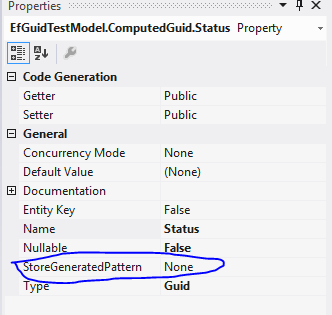
Click on the "Status" scalar property to view its properties.


Keep a close eye on the "StoreGeneratedPattern". This properties is what EF uses to determine the value population strategy of the given column. The available options are "Identity" and "Computed".

We set the binding in the SQL Server to auto populate the "Status" column (NewId()). However when we add a new row to the table using EF, following is what we get.


This is most surely not that we want. The "Status" value is set to the default Guid value.

Fixing the issue

Actually the fixing the problem is pretty easy... What we need to do is to return to the conceptual model and update the "StoreGeneratedPattern" of "Status" property to "Computed" as below.


By updating the property to "Computed"; it notifies the EF that the value of the property is calculated by the store (in this case SQL Server).


Just watch out!

Tuesday, 25 December 2012

Udacity CS101

I completed CS101 course offered by Udacity few days ago.

I must admit that I could not get every answer correct. This is the first time I am using Python and it opened a whole new avenue for me. It really sparked my curiosity with Python.

I highly recommend this course for anyone who is interested in learning computer science.

My certificate :-)

Saturday, 15 December 2012

Playing with Windows Service Bus 1.0 !!

I started looking at Windows Service Bus and Google was giving me a ton of resources for Azure service bus. I want Windows Service Bus!!

I started by reading through this article. 

I managed to configure Windows Service bus using the instructions in this note. (See below).


I am using Windows 8 and using SQL Server Express 2012.

Once the installation was complete, I followed this note. One thing to note here is that the NuGet package name has changed from "Service Bus 1.0 Beta (for Windows Server)" to "Service Bus 1.0 for Windows Server".

I was unable to complete the exercise and the application was failing with an Authorisation failed  exception. 
However after playing with it for a bit, I managed to get it to work. The key to watch out are the Service Bus URIs. These can be found at the bottom of the dialog after configuring the Service Bus. (See below). 

The EndPoint is where the Service Bus is available at; and STSEndPoint is where the token for accessing the Queue is obtained. So... keep a note of these URIs. 

Code is here. (If you do look start looking at the code make sure to start the sender first and then the receiver.)