Thursday, 5 June 2014

Do I really need a Hidden field?

As more and more SPA (Single Page Application) comes into life, maintaining state in the client side is critical for user experience.

Traditionally we use the following methods to maintain state in the client side.

  • Cookies
  • Hidden fields
  • Query string
  • JavaScript objects
  • Local storage
  • Session storage
The last two lean towards the "new" HTML 5 standard. Each has its pros and cons and I am sure a simple search will yield good dozen articles.

I was working on a legacy web application and used a hidden field to maintain state in the client side. During a code review, a fellow developer asked the question "Do we really need a hidden field?".

Hidden fields

Declaring a hidden field is ever so simple (e.g. <input type="hidden" .../>). Now consider the scenario where the hidden field is defined in a form (e.g. <form> tag). (how we are talking...!).

When the page posts back to the server, all the input elements including hidden fields are sent to the server. So the real question is whether there is a real value by sending this hidden field you used for client-side state management? If your site is getting millions of hits every hour, you would like to keep the traffic between client and the server to a minimum.

Set a "class"

My fellow developer suggested to store the state in a "class". Let me explain... Rather than setting a hidden field, add a class to the relevant container (e.g. div) and use JQuery $.hasClass function to check whether the class is set.

Initially this pattern did not register in my brain as I thought it was "odd" to store state as a "class" in the markup. But then again it was not totally insane. However there is the question whether you are bleeding "logic" all-over-the-place.

Use modern patterns

I totally understand that none of the above methods are elegant. But remember, few years ago data-binding in JavaScript was unheard of. Even the use of XHR/Ajax was not widespread.

The most elegant solution might be to use MVVM-type JavaScript library such as KnockoutJs.

It is not an easy task to convince a business to migrate core systems to latest libraries or packages. However as developers (for our sanity) we should attempt to structure code that is modular and easier to maintain!

Monday, 19 May 2014

Minute with Java Vs C# - Type Covariance

It has been a while since I had a look at Java. (I really have a soft spot for Java!).

There are some really good articles on the web about Type Covariance. In a nutshell this is the ability to preserve/use a specific derived type in place of a general type.

Consider the following Java example. (Compiled with JDK 1.7).

I like the type covariance here. Even tough the "CanDoSomeWork" interface expects "SomeWork", the actual implementation allows a derived type of "SomeWork". In the following context, the type "Cat".


From the consumers point of view, there is no need for casting.


However if you try this in C# you will get the following.

Type Covariance in C# Vs Java 1.7 (7)


I think what Java compiler has done here is pretty cool, and neat. However I have some doubts.

Normally in a larger/enterprise scale application, IoC containers are used. It is the responsibility of the IoC container to create instances and manage their life-styles. Since the code is normally developed against an abstraction (e.g. interface), the consumer always expects the generalised type (think LSP).

 I am not sure how to use this feature really... may be its my lack of imagination or misunderstanding. :-(

Monday, 12 May 2014

Notes around .NET threading, use of timers etc

I was listening to Jeffrey Richter and he mentioned the how widespread the incorrect use of .NET threads. There is no point reinventing the wheel, simply have a look at the following code. It looks very harmless, however it is a course for real concern.


The comments in the code speak for itself. However is this "better" than using "Thread.Sleep" to pause a thread... :-)

Sunday, 12 January 2014

Head First HTML5 - Geolocation notes


  • The Geolocation is a pretty much in the HTML5 standard. The goal of Geolocation API is to find out the longitude and latitude of the accessing device (whatever it may be). There are multiple ways of finding the location of the user. These methods are through IP address, GSM triangulation,  GPS and WiFi. 
  • The older browsers may not support Geolocation, therefore we need to ensure that this feature is available before using it.
  • The Geolocation API is part of the navigator object. See the following code.


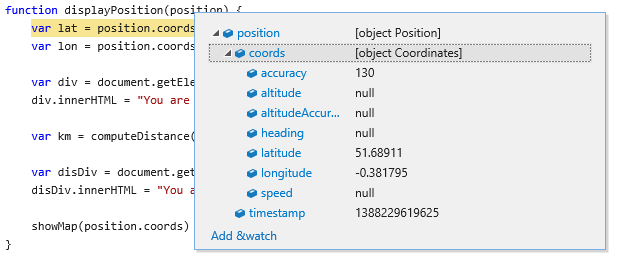
  • What is most interesting is the object returned by calling the "getCurrentPosition" position. BTW the "displayPosition" and "displayError" are functions. Basically "getCurrentPosition" takes in 3 arguments. These are success, failure and options. (just search for details.)
  • The object returned by "getCurrentPosition" looks like below.

The composition of "Position" object


  • The 3ed argument to the "getCurrentPosition" is the options. The properties that comprise this object are "enableHighAccuracy" (false), "timeout" (Infinity), "maximumAge" (0 - in milliseconds). The browser returns the result that is determined less than the "maximumAge". 
    • Setting "maximumAge" to 0 may force the browser to get a new position.
    • Setting "timeout" to 0 and "maximumAge" to 0 will cause the error handler to be called if there is not a new position immediately. (may call the error handler immediately.)
    • Setting "timeout" to 0 and "maximumAge" to 1000 (1 second) may cause the browser to return a position that is less than 1 second old. If not error handler is called.
  • The other methods in the Geolocation API are "watchPosition" and "clearWatch". The callback registered in "watchPosition" is invoked whenever the position changes (e.g. moving around). As the "watching" function is expensive we can "cancel" watching by calling "clearWatch". The handler returned from calling "watchPosition" is used to cancel a watch.


Monday, 30 December 2013

Head First HTML5 - JavaScript notes (2)

"namespace"


  • There is no strict "namespace" construct in JavaScript similar to C#. The notion of "namespace" is used to reduce the scope of the variables and prevent polluting the global namespace. 

The output looks like the following:
Simple "Namespace" 

  • The next step is to add functions to this namespace. We can use a self-executing function for this purpose. See the following. The idea is to add our custom functions to the namespace.


Saturday, 28 December 2013

Head First HTML5 - JavaScript notes (1)


Basic
  • JavaScript is not a statically typed language. The core types are Object, String, Number, Boolean.
  • The properties of an object can be accessed through "." or ["property name"] syntax (e.g. obj["name"], obj.name)
  • Arrays are pretty standard. Two ways of declaring. See below:
  • JavaScript objects are not "typed", instead think in terms of the "shape" of the object. See below.


Functions
  • Functions does not require a name. This is like anonymous functions in C#.
  • Functions can be considered "value" and it can be passed around as variable. Think about "Action" or "Func" (delegates) in C#.
  • Variables declared as "var" in functions scoped to the function itself. It is a good practice to scope variables to functions. 
  • Normally when passing arguments to functions, be aware that the primitive types are passed by "value" and objects are passed by "reference". The "reference" allows to get to the original object, similar to C#. See the following code.


  • Objects can contain behaviour which is achieved through functions (method). See below: 


  • The notion of constructor can be used to create an "object". The constructor in this case is a function.  See the following:


Most importantly the "new" keyword is used to create a new instance of "Dog". Its a convention to capitalise the constructor function.

  • The methods attached to an object can use "this" in the body. The "this" keyword refers to the object that the method is contained in. Normal functions may not use "this" in the similar fashion to a method in an object. 

Wednesday, 10 July 2013

Curse of the Base class

Please do not get me wrong, Inheritance has its place.

In this post, I will share a very badly designed base class implementation. The goal is not to criticise someones work, but to learn from it.

Some code

The Platform (developed by a 3ed party) we use had a base-class implementation that was similar to the following.

The class itself looks innocent but it has massive problems. The following is the example provided in the documentation.

So how can we actually unit test this code. Nightmare!

Refactor (ugly)


We need to organise the class so that is it suitable for unit testing.

The following is my first attempt. (Remarks: I am using bastard injection in this example.)

We have removed the call to the base class "Add" method in the derived class "Add". The most odd looking code is in the public constructor. It is calling the internal constructor with "IDatabase" and null. If you remember the constructor resolution order, you might remember that the public constructor is resolved last (in the above example). This means that the "_addAction" delegate is initialised twice. Once with null then by the actual value from the public constructor.


Unit test

Sorry, ideally you should be writing a test first. (TDD!).

The unit test should focus on the code we wrote, not what is provided by the Platform.

Its all here.